

倒數第二天了,各位今年有參加鐵人賽嗎?記得去年寫【不用庫 也能酷 - 玩轉 CSS & Js 特效】的時候緊張到好幾天晚上做惡夢夢到忘記發文,不過今天我心裡特別平安,因為我寫了一個 GitHub Actions 來提醒我每小時發文。

它的原理很簡單,就是每小時觸發一次 Action,然後使用靜態爬蟲爬取我的鐵人賽頁面,檢查是否有今天的文章,如果沒有就發送一封郵件給我。今天就讓我們一步步來實作這個 Action 吧!
今日範例程式:開啟第 29 天範例程式 其實如果你有發現的話,這個 repo 底下一直有一個 check 資料夾,這個就是每天提醒我發文的 Action。
實作爬蟲
觀察頁面
我們先實作一個簡單的爬蟲,來爬取我的鐵人賽頁面,然後檢查是否有今天的文章。觀察一下可以發現鐵人賽每頁只會顯示 10 篇文章,所以我們需要根據日期來判斷今天是第幾天,要看第幾頁的資料。比如說要看第二頁的資料就是:
https://ithelp.ithome.com.tw/users/20139821/ironman/7503?page=2再觀察一下可以發現顯示天數的 HTML 結構是這樣的:
<span class="ir-qa-list__days ir-qa-list__days--profile ">DAY 1</span>
所以我們只需要到正確的頁面找到有沒有這串文字就可以了。
初始化 Node.js 專案
首先我們先在 GitHub 上建立一個新的專案,然後在本地初始化一個專案。今天我們來使用 Yarn 來初始化專案。
mkdir remind-me-to-postcd remind-me-to-postgit inityarn inityarn add node-fetch這裡我們使用 node-fetch 來發送 HTTP 請求,這樣我們就可以在 Action 中使用這個套件來爬取網頁。因為我們只是要檢查是否有今天的文章,所以不需要使用 Puppeteer 這種重量級的爬蟲套件,或是 Cheerio 這種解析 HTML 的套件。
實作爬蟲
import fetch from "node-fetch";const now = new Date();const nowUTC8 = new Date(now.getTime() + 8 * 60 * 60 * 1000);// minus 2024/9/15, calculate how many days after.const days = Math.floor((nowUTC8 - new Date("2024-09-14")) / (24 * 60 * 60 * 1000));const url = "https://ithelp.ithome.com.tw/users/20139821/ironman/7503?page=" + Math.ceil(days / 10);fetch(url) .then(res => res.text()) .then(html => { // remove all tabs and spaces in the html const htmlNoSpace = html.replace(/\s/g, ""); // check if html include <spanclass="ir-qa-list__daysir-qa-list__days--profile">DAY5</span> //console.log(htmlNoSpace); // The raw HTML of the page if (!htmlNoSpace.includes(`<spanclass="ir-qa-list__daysir-qa-list__days--profile">DAY${days}</span>`)) { // call discord webhook, and send message to discord fetch(process.env.DISCORD_WEBHOOK, { method: "POST", headers: { "Content-Type": "application/json" }, body: JSON.stringify({ content: `@everyone 第${days}天的文章還沒發布喔!` }) }) .then(() => { console.log("Day", days, "not published yet. Message sent to Discord."); }) .catch(err => { console.error("Error sending message to Discord:", err); }); } }) .catch(err => { console.error("Error fetching page:", err); });來看一下這段程式碼:
- 首先我們取得現在的日期,然後計算到 2024/9/15 之後幾天。
- 根據天數計算出我們要爬取的頁面。
- 使用
node-fetch發送 HTTP 請求,取得頁面的 HTML。 - 移除 HTML 中的空白字元,然後檢查是否有今天的文章。
- 如果沒有今天的文章,就使用 Discord Webhook 來發送訊息給我。
- 如果有任何錯誤,就印出錯誤訊息。
設定 Discord Webhook 至 GitHub Secrets
這裡我們使用 Discord Webhook 來發送訊息給我,所以我們需要先設定一個 Webhook。首先我們需要在 Discord 上建立一個伺服器,然後建立一個文字頻道,然後在頻道設定中找到 Webhook,然後建立一個 Webhook。
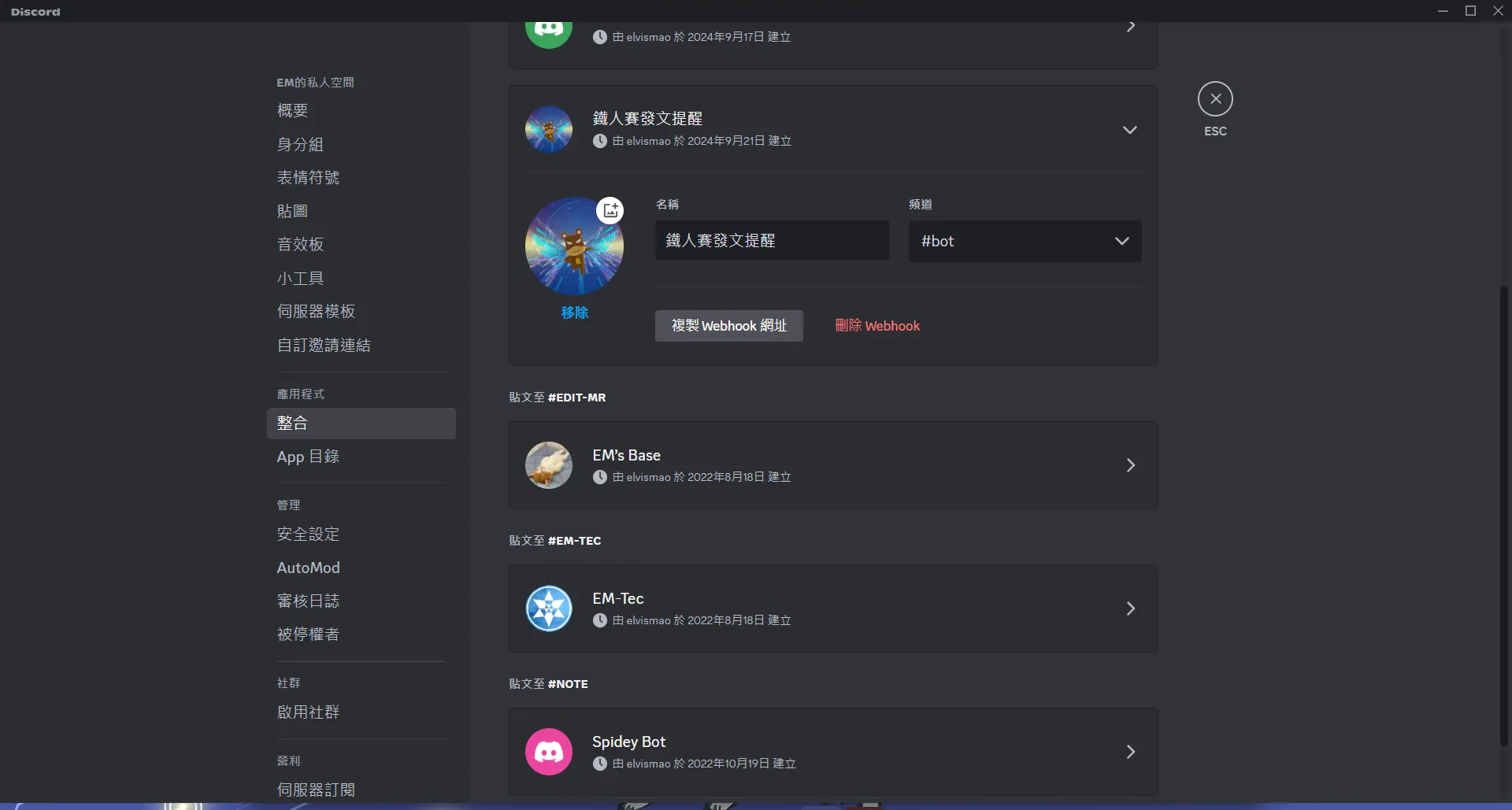
建立 Webhook 之後,我們就可以取得 Webhook 的 URL,然後設定到 GitHub 的 Secrets 中。
撰寫 GitHub Actions
接著我們就可以撰寫 GitHub Actions 來執行這個爬蟲了。
# @formatname: 鐵人賽發文檢查on: # every hour from 12:00 to 23:00 schedule: - cron: "0 4-16 * * *" workflow_dispatch:jobs: run-check: runs-on: ubuntu-latest steps: - name: Checkout Repository uses: actions/checkout@v3 - name: Set up Node.js uses: actions/setup-node@v3 with: node-version: "20" - name: Change Directory to 'check' run: cd check - name: Install Dependencies run: yarn install working-directory: ./check - name: Run Node.js Script run: node index.mjs working-directory: ./check env: DISCORD_WEBHOOK: ${{ secrets.DISCORD_WEBHOOK }}這裡要注意由於 GitHub Actions 的時區是 UTC,所以我們需要將時間 +8 小時,這樣才能在正確的時間執行 Action。這裡我們設定每小時執行一次,從凌晨 12 點 (因為這時候我通常還沒睡,或是一早能看到)。接下來是從中午 12 點到晚上 11 點每個小時執行一次。
執行 Action
最後我們就可以將這個 Action 推送到 GitHub 上,然後等待每個小時的提醒了。
git add .git commit -m "feat: add remind me to post"git push origin main這樣我們就可以在每個小時收到提醒了,不用擔心忘記發文了!

留言
留言區