

昨天我們做了一個開關,那麼我們今天就來做一個選單吧!

這個雖然是一種 radio 選單,但對於選擇數字這種有連續性,或著是比較短的文字,使用這種風格都是一種不錯的選擇。可以讓版面更乾淨,也比下拉式選單或著是傳統的 radio 都更方便操作。重點是不用寫一行 JavaScript,只要純 CSS 就可以完成。
原理
和昨天的類似,不過今天不需要 <label>。點擊透明的 <input> 之後後面的一個圓形 <div> 就會跑過來。最上面用一層 <div> 疊上去數字即可,當然你要使用 <label> 也是可以的。
開始做吧!
照剛才原理寫出 HTML,然後加上 CSS 即可。
HTML
<div class="hope-container"> <input type="radio" name="hope" value="0" /> <input type="radio" name="hope" value="1" /> <input type="radio" name="hope" value="2" checked="" /> <input type="radio" name="hope" value="3" /> <input type="radio" name="hope" value="4" /> <div class="hope-selected"></div> <div class="hope-label"> <div>0</div> <div>1</div> <div>2</div> <div>3</div> <div>4</div> </div></div>新擬物化設計 Neumorphism 的介面
CSS 的部分我想要製作使用新擬物化設計 Neumorphism,或是說 Soft UI 的風格。有點像 iPhone3 擬物化設計跟 iPhone5 之後現代扁平化設計結合。有很明顯得陰影但又很有質感。
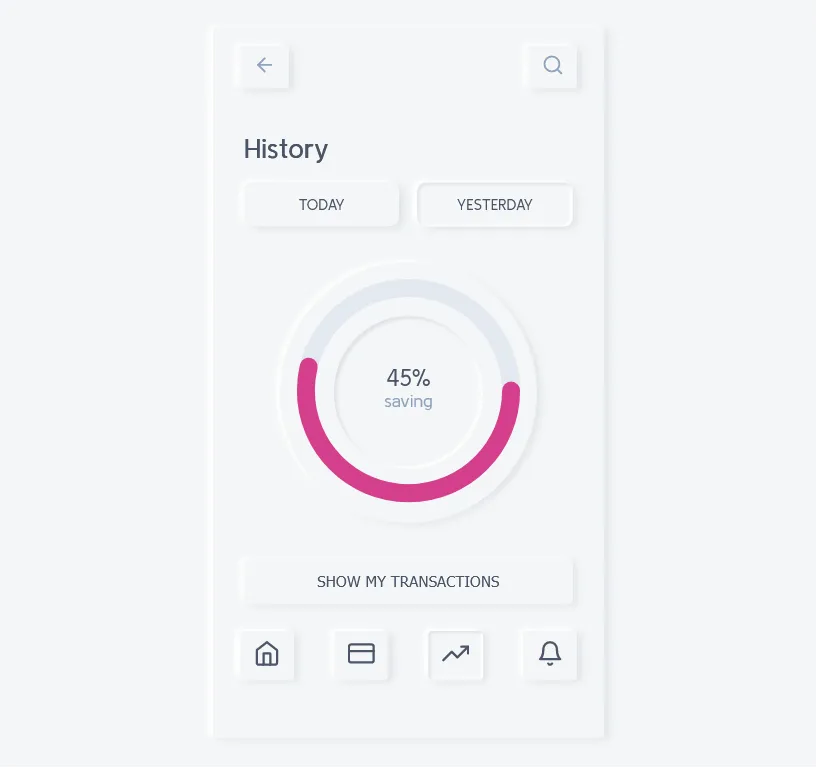
基本外框如下
* { padding: 0; margin: 0; transition: all 0.2s;}body { display: flex; justify-content: center; align-items: center; min-height: 100svh; background: #e6e7ee;}.hope-container { height: 2rem; border-radius: 2rem; position: relative; display: flex; box-shadow: 3px 3px 6px #b8b9be inset, -3px -3px 6px #fff inset; background-color: #e6e7ee;}選擇框
這是裡面看不到的輸入框
.hope-container input { width: 2rem; height: 2rem; display: block; opacity: 0; cursor: pointer;}顯示數字
上面疊數字。為了讓數字對齊每個都寬度設為 2rem 再置中。
.hope-label { position: absolute; left: 0; pointer-events: none; display: flex; align-items: center; justify-content: space-between; width: 100%; height: 2rem;}.hope-label > div { width: 2rem; text-align: center;}小球
最後是選擇,並會左右移動的圓形。設定 position: absolute 並用 left 屬性來移動他的位置。這樣就可以做到左右移動的效果。
.hope-selected { width: 2rem; height: 2rem; position: absolute; left: 0; border-radius: 50px; background: #7a85dc; pointer-events: none; box-shadow: 0 0 3px #545fb6 inset;}移動小球
根據選擇的值來移動小球。這邊使用 nth-child 來選擇第幾個元素。如果被勾選就會觸發 CSS 移動球到對應的位置。
.hope-container input:nth-child(2):checked ~ .hope-selected { left: 2rem;}.hope-container input:nth-child(3):checked ~ .hope-selected { left: 4rem;}.hope-container input:nth-child(4):checked ~ .hope-selected { left: 6rem;}.hope-container input:nth-child(5):checked ~ .hope-selected { left: 8rem;}裡面的數字變色一下,不然紫色實在太暗了
.hope-container input:nth-child(1):checked ~ .hope-label > div:nth-child(1) { color: #e6e7ee;}.hope-container input:nth-child(2):checked ~ .hope-label > div:nth-child(2) { color: #e6e7ee;}.hope-container input:nth-child(3):checked ~ .hope-label > div:nth-child(3) { color: #e6e7ee;}.hope-container input:nth-child(4):checked ~ .hope-label > div:nth-child(4) { color: #e6e7ee;}.hope-container input:nth-child(5):checked ~ .hope-label > div:nth-child(5) { color: #e6e7ee;}好啦,這樣就做完了!
以上就是我今天的分享,你可以根據你的喜好增加陰影或其他動畫效果。歡迎在 Instagram 和 Google 新聞追蹤毛哥EM資訊密技,也歡迎訂閱我新開的YouTube 頻道:網棧。
我是毛哥EM,讓我們明天再見。

留言
留言區