

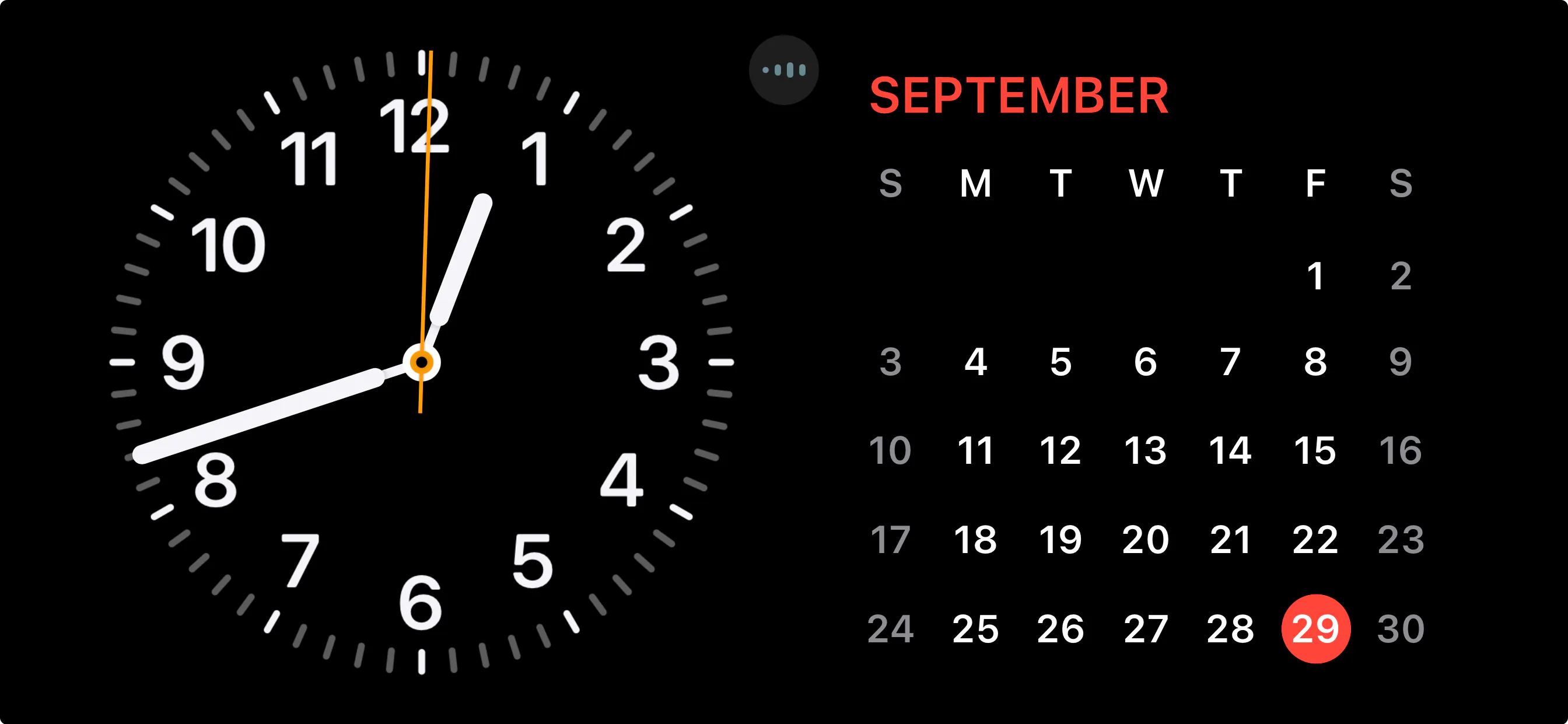
今天我們要來製作一個時鐘。不使用圖片,只使用 CSS 來繪製。我的目標是可以做出類似於 Apple iOS17 StandBy 的時鐘效果。
HTML
首先是 HTML,非常老實。一個時鐘,裡面 3 個指針,兩個中間的裝飾軸圓圈,以及 12 個數字。度數和數字分別用 CSS 變數和 HTML 屬性存放。當然你要都用 CSS 也可以,我只是想示範怎麼使用。
<div class="clock"> <div class="hour-hand"></div> <div class="minute-hand"></div> <div class="second-hand"></div> <div class="clockCenter"></div> <div class="clockCenterCenter"></div> <div class="digit" style="--deg: 0;" data-digit="12"></div> <div class="digit" style="--deg: 30;" data-digit="1"></div> <div class="digit" style="--deg: 60;" data-digit="2"></div> <div class="digit" style="--deg: 90;" data-digit="3"></div> <div class="digit" style="--deg: 120;" data-digit="4"></div> <div class="digit" style="--deg: 150;" data-digit="5"></div> <div class="digit" style="--deg: 180;" data-digit="6"></div> <div class="digit" style="--deg: 210;" data-digit="7"></div> <div class="digit" style="--deg: 240;" data-digit="8"></div> <div class="digit" style="--deg: 270;" data-digit="9"></div> <div class="digit" style="--deg: 300;" data-digit="10"></div> <div class="digit" style="--deg: 330;" data-digit="11"></div></div>CSS
CSS 要怎麼畫出時鐘呢?我們會需要幫這個 div 添加幾個漸層。
時間刻度 - conic-gradient
為了方便大家比較我把圖放在一起。
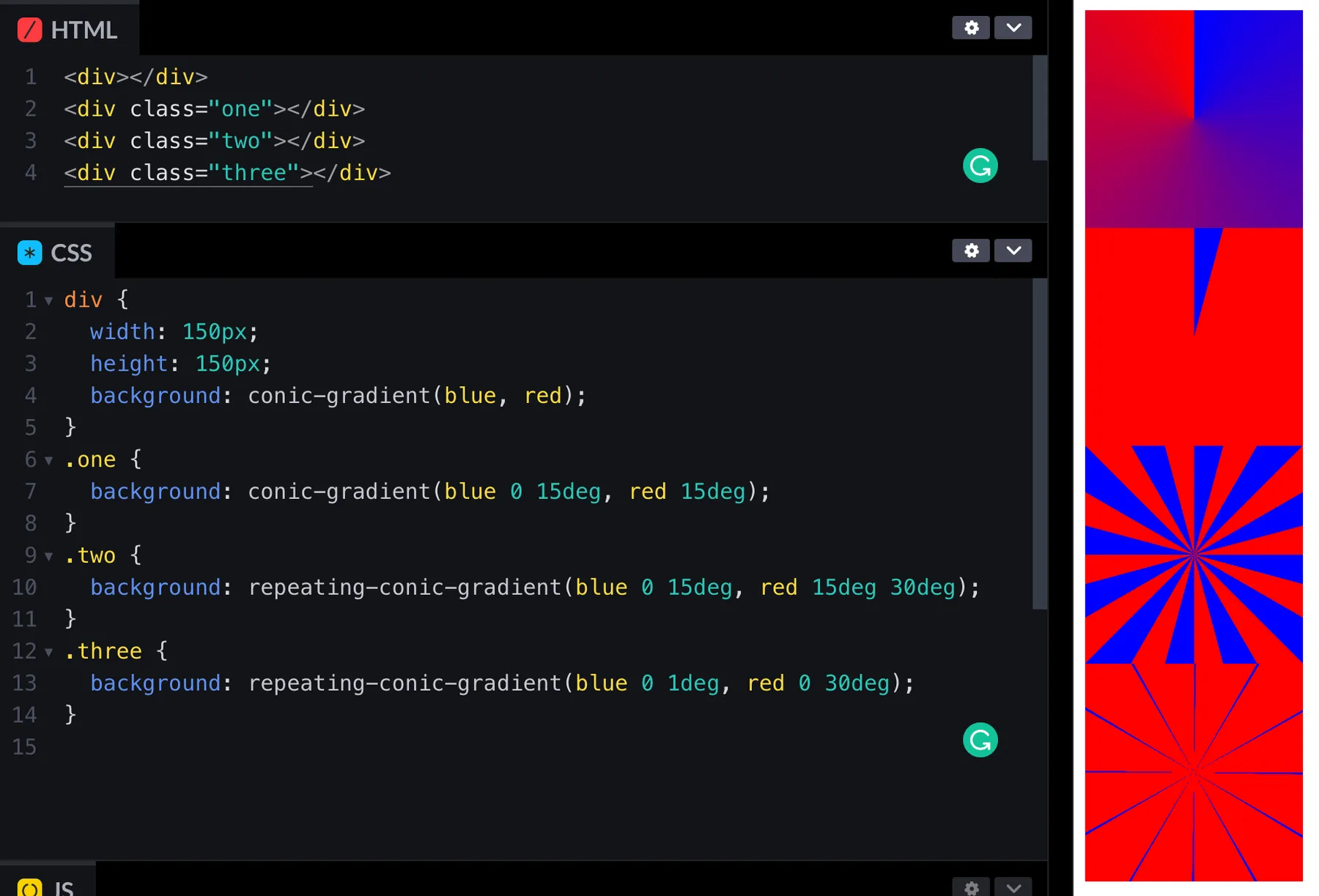
conic-gradient 的語法和其他漸層語法很相似。繞一圈跑,可以設定開始和結束的角度,沒寫角度就自動平分。比如說第一個:
div { width: 150px; height: 150px; background: conic-gradient(blue, red);}如果你這樣打會得到一個錐形。和 linear-graient 的圖形原理相同,就是不給他過度的區域。
.one { background: conic-gradient(blue 0 15deg, red 15deg);}設定開始結束角度就可以改成 repeating-conic-gradient 讓他重複。記得是 repeating 不是 repeat 喔~
.two { background: repeating-conic-gradient(blue 0 15deg, red 15deg 30deg);}最後把角度條寫一點就可以囉~
.three { background: repeating-conic-gradient(blue 0 1deg, red 0 30deg);}圓形 radial-gradient
radial-gradient 會從裡到外。一樣原理,不給他地方漸層就會出現圓形。讓他原形畢露
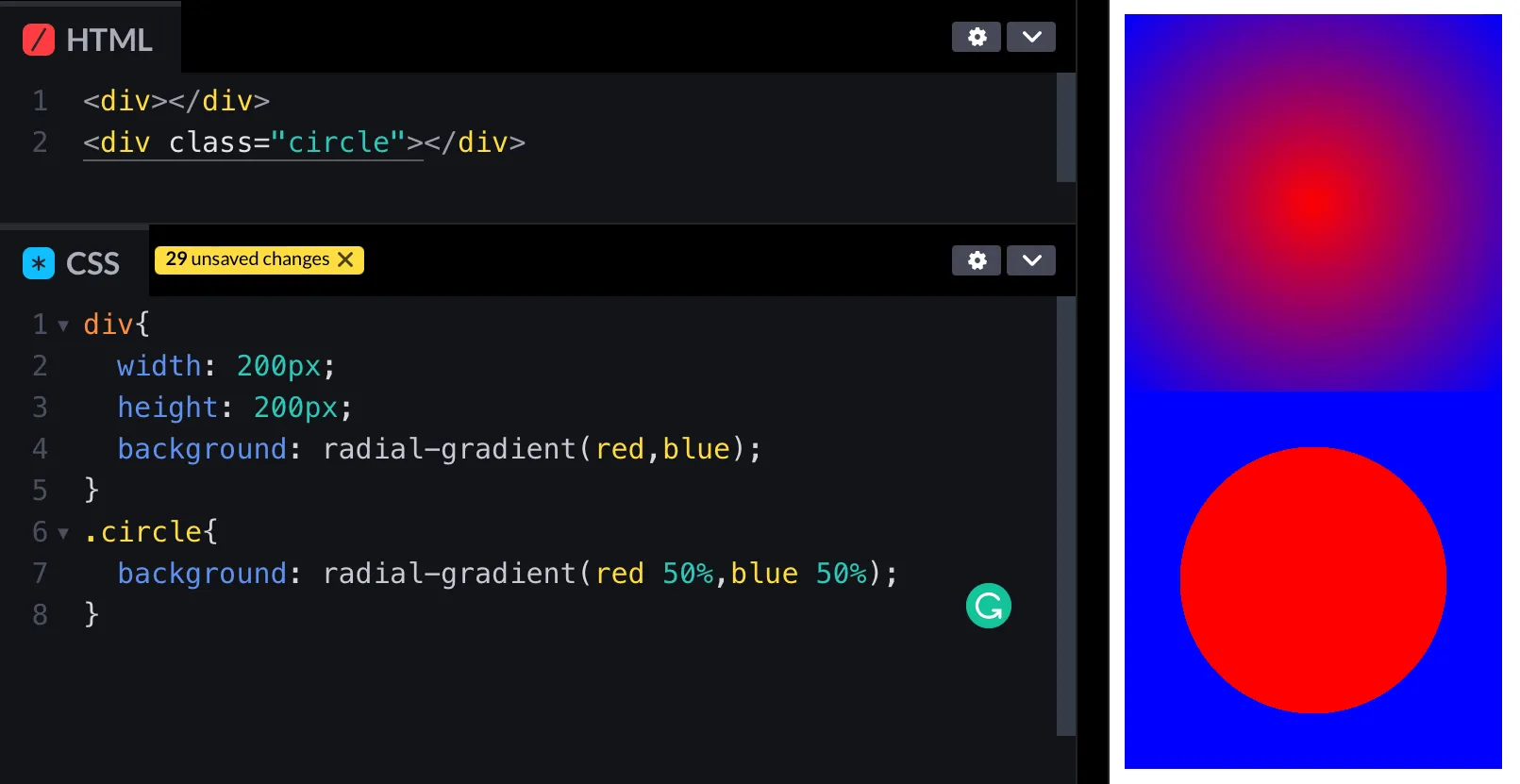
div { width: 200px; height: 200px; background: radial-gradient(red, blue);}.circle { background: radial-gradient(red 50%, blue 50%);}這樣就可以把時鐘中間的部分挖出來囉。
旋轉時間
這個也蠻有趣的。首先在時鐘的中間放一個 div,用為元素在右邊放數字。
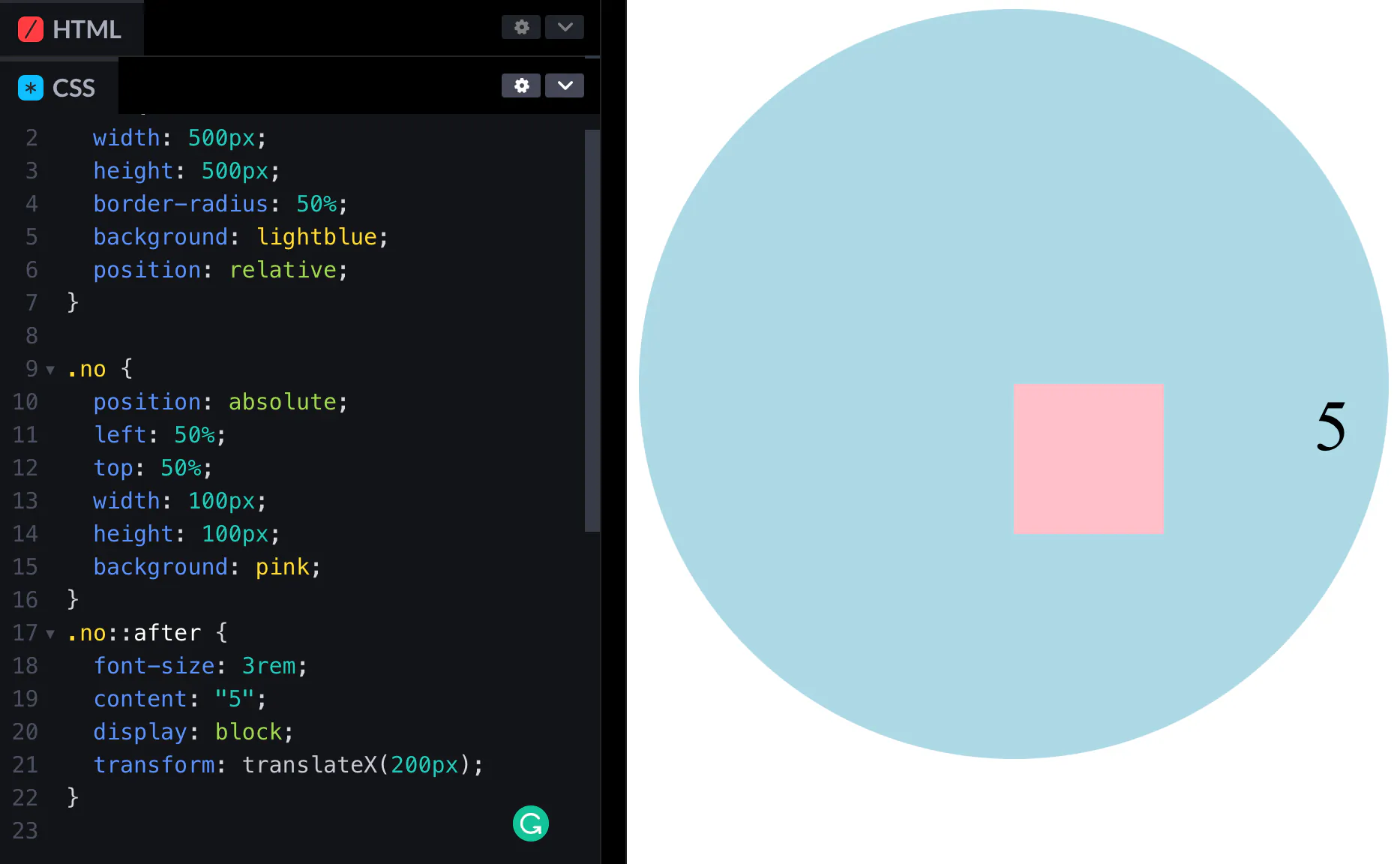
<main> <div class="“no”"></div></main>main { width: 500px; height: 500px; border-radius: 50%; background: lightblue; position: relative;}.no { position: absolute; left: 50%; top: 50%; width: 100px; height: 100px; background: pink;}.no::after { font-size: 3rem; content: “5”; display: block; transform: translateX(200px);}旋轉方塊裡面裡面數字也會跟著轉。

.no { position: absolute; left: 50%; top: 50%; width: 100px; height: 100px; background: pink; transform: rotate(60deg);}不過這樣數字就歪了!沒事,偽元素轉回來就好了。
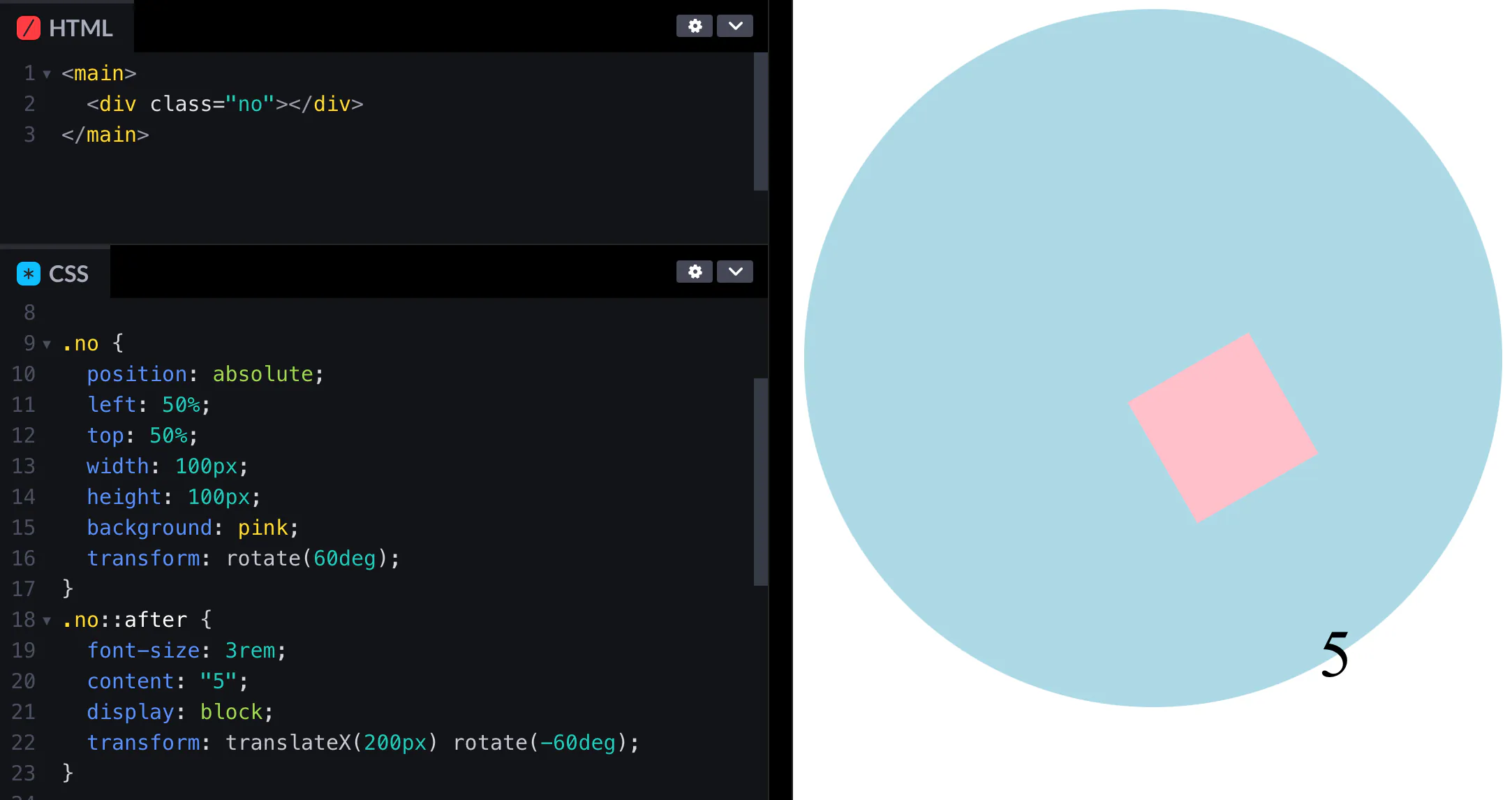
.no::after { font-size: 3rem; content: “5”; display: block; transform: translateX(200px) rotate(-60deg);}你會發現因為我們剛才所有元素定位點都是靠上對齊所以有點偏移,沒關係最後再校正回歸就可以了。
指針
指針就跟剛才的粉紅正方形一樣,只是長一點而已。選轉定位點記得放在中間上面喔,這樣才能指對方向。
transform-origin: center center;在一起
把以上所以的和在一起吧。
body { display: flex; align-items: center; justify-content: center; min-height: 100svh; background: #000; font-family: system-ui; font-weight: 800;}.clock { width: 300px; height: 300px; background: radial-gradient(#000 65%, transparent 10%), repeating-conic-gradient(from -0.5deg, #fff 0 1deg, transparent 0deg 30deg), repeating-conic-gradient(from -0.5deg, gray 0 1deg, transparent 0deg 6deg); border-radius: 50%; position: relative;}.digit::before { content: attr(data-digit); display: block; transform: rotate(calc(var(--deg) * -1deg)); text-align: center;}.digit { position: absolute; top: calc(50% - 15px); left: calc(50% - 16px); width: 1em; height: 1em; font-size: 2em; color: #fff; transform: rotate(calc(var(--deg) * 1deg)) translateY(-115px); transform-origin: center center;}.clockCenter,.clockCenterCenter { position: absolute; top: 50%; left: 50%; transform: translate(-50%, -50%); width: 12px; height: 12px; background: #ffaf3f; border: 0.1em solid #fff; border-radius: 50%; display: block;}.clockCenterCenter { background: #000; border: none; width: 6px; height: 6px; z-index: 10;}.hour-hand,.minute-hand,.second-hand { position: absolute; top: 50%; left: 50%; background-color: #fff; transform-origin: top center;}.hour-hand,.minute-hand { width: 10px; height: 70px; margin-left: -5px; border-radius: 5px;}.minute-hand { height: 128px;}.hour-hand::after,.minute-hand::after { transform: translateY(-0.7em); display: block; content: ""; width: 4px; margin-left: 33.333333%; height: 50px; background-color: #fff;}.second-hand { width: 2px; height: 168px; margin-left: -0.7px; background-color: #ffaf3f; border-radius: 2px 2px 0 0; transition: transform 0.2s;}JavaScript
JavaScript 沒有什麼難的。就是小學數學題算時鐘走幾度。比如說秒針一分鐘走一圈,所以一秒走 360 除以 60 等於 6 度。
需要注意一下的是因為指針的定位點在中間上面,所以一開始是在 6 點鐘方向。你可以把指針改成從中間下面對齊,或著是度數直接加半圈。
const hourHand = document.querySelector(”.hour-hand“);const minuteHand = document.querySelector(”.minute-hand“);const secondHand = document.querySelector(”.second-hand“);function updateClock() { const now = new Date(); const hours = now.getHours(); const minutes = now.getMinutes(); const seconds = now.getSeconds(); const hourRotation = ((hours % 12) * 360) / 12 + ((minutes / 60) * 360) / 12 + 180; const minuteRotation = ((minutes % 60) * 360) / 60 + ((seconds / 60) * 360) / 60 + 180; const secondRotation = ((seconds % 60) * 360) / 60 + 180; hourHand.style.transform = `rotate(${hourRotation}deg) translateY(18px)`; minuteHand.style.transform = `rotate(${minuteRotation}deg) translateY(20px)`; secondHand.style.transform = `rotate(${secondRotation}deg) translateY(-18px)`;}setInterval(updateClock, 1000);updateClock();正當你以為終於結束的時候,你無意間看到了這個畫面…
結果對了,方法錯了。因為角度降回 180,結果他還真的轉回去。
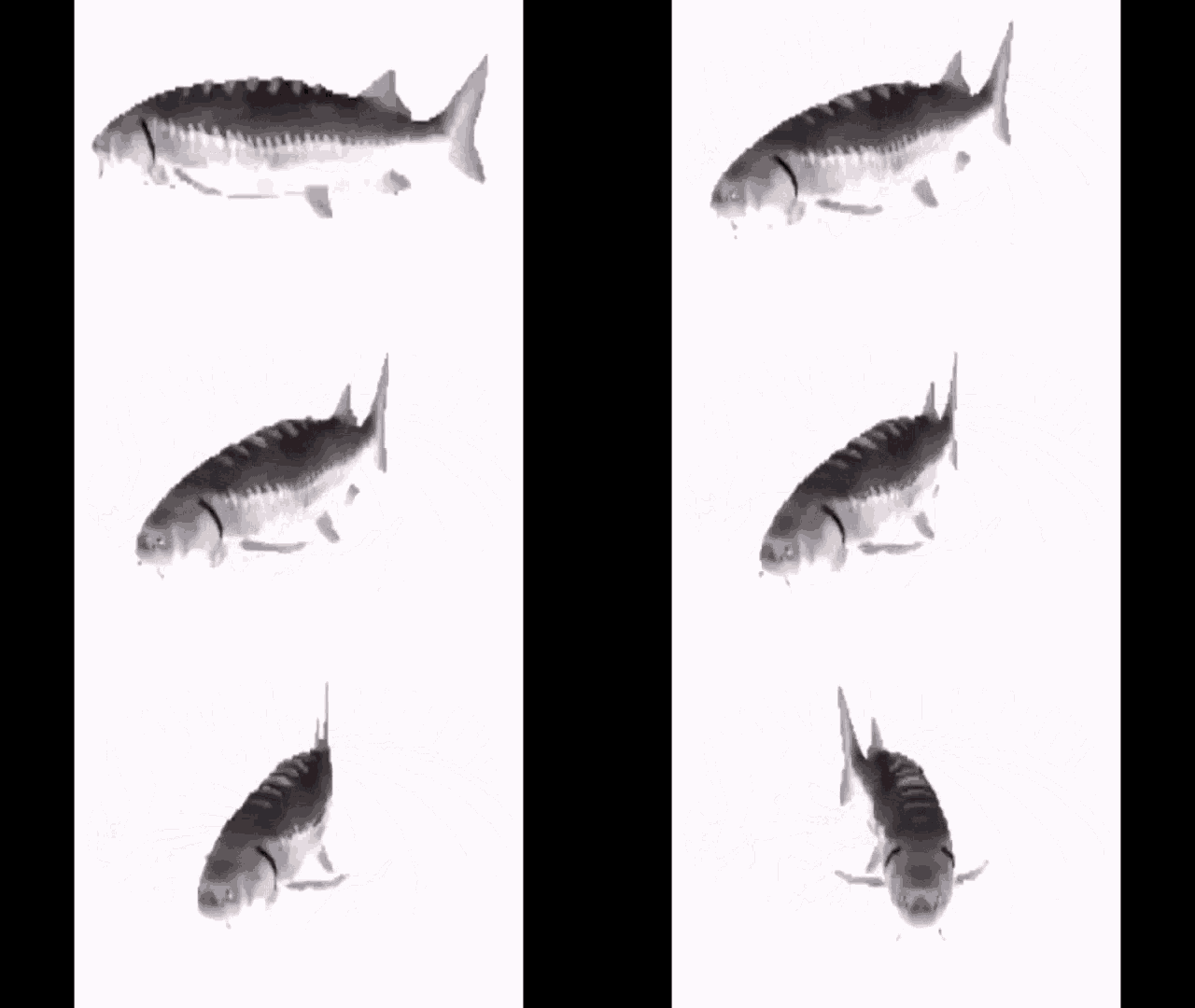
想要讓他一直轉下去就要提醒他莫忘初衷,把之前轉的度數都加進去即可。
const hourHand = document.querySelector(".hour-hand");const minuteHand = document.querySelector(".minute-hand");const secondHand = document.querySelector(".second-hand");function updateClock() { const now = new Date(); const hours = now.getHours(); const minutes = now.getMinutes(); const seconds = now.getSeconds(); const hourRotation = ((hours % 12) * 360) / 12 + ((minutes / 60) * 360) / 12 + 180; const minuteRotation = ((minutes % 60) * 360) / 60 + ((seconds / 60) * 360) / 60 + 180 + hours * 360; const secondRotation = ((seconds % 60) * 360) / 60 + 180 + (hours * 60 + minutes) * 360; hourHand.style.transform = `rotate(${hourRotation}deg) translateY(18px)`; minuteHand.style.transform = `rotate(${minuteRotation}deg) translateY(20px)`; secondHand.style.transform = `rotate(${secondRotation}deg) translateY(-18px)`;}setInterval(updateClock, 1000);updateClock();終於成功啦!有個 87% 像吧 w

以上就是我今天的分享。我有看到有人是算了第一個角度之後就每秒固定加上去度數。不過萬一你有延遲或者是卡頓他的時間就會跑掉了,所以我還是建議每次都重新抓時間做計算。歡迎在 Instagram 和 Google 新聞追蹤毛哥EM資訊密技,也歡迎訂閱我新開的YouTube 頻道:網棧。
我是毛哥EM,讓我們明天再見。

留言
留言區